
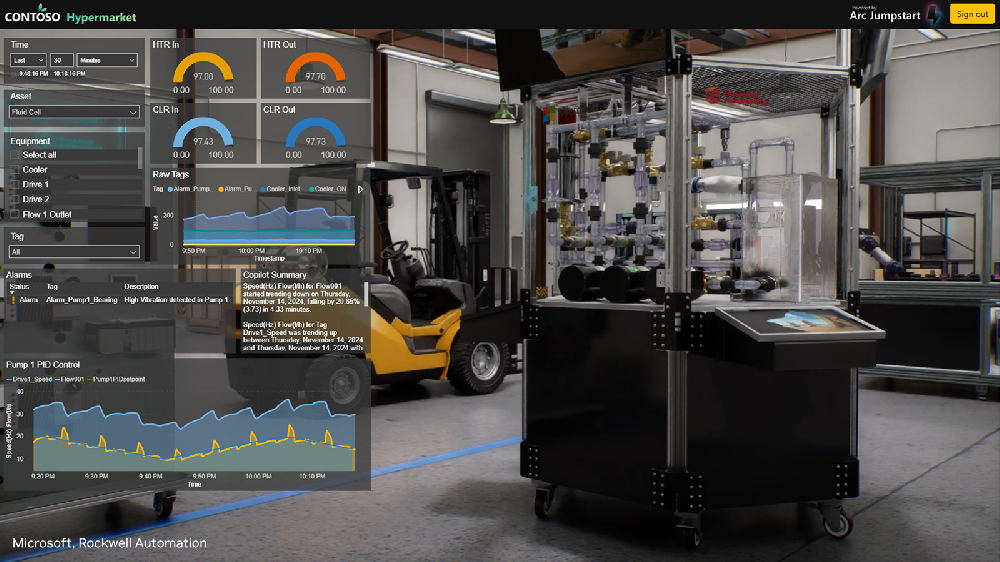
Organizations building remote industrial monitoring workflows can use the NVIDIA and Microsoft Azure reference architecture as a starting point for connecting edge IoT telemetry with a physically accurate 3D digital twin. The described approach combines Azure IoT Operations, Power BI, OpenUSD assets, and NVIDIA Omniverse Kit application streaming to present operational data in an interactive 3D environment.
The monitoring problem this architecture addresses
Industrial operations teams have traditionally monitored distributed facilities through 2D dashboards and data visualizations. These tools can show telemetry and reports, but they may make it difficult to relate operational data to the equipment, processes, and workflows represented by that data.
The reference workflow described in the source is intended for teams operating from remote operations centers and supervising distributed production sites. It connects dynamic IoT data from environments such as factory floors and smart buildings with 3D models of industrial systems and production environments. The resulting application experience combines an embedded 3D viewport with Power BI reporting and analytics.
Capabilities supported by the reference workflow
The published guidance describes an end-to-end workflow rather than a finished, universally deployable product. Its core elements include:
- Edge telemetry orchestration through Azure IoT Operations.
- Telemetry stream contextualization through Azure Data Explorer.
- Management of digital models, including USD assets, in Azure Blob Storage.
- Scene rendering and application streaming with Omniverse Kit App Streaming.
- An interactive operations digital twin that brings together a 3D viewport and Power BI reports.
The workflow shows how factory-floor IoT data can update Power BI reports integrated with an OpenUSD-based application developed on the NVIDIA Omniverse platform. Developers can use the associated Azure Arc Jumpstart guidance and public GitHub repository referenced in the source to examine how IoT data is connected to Power Platform and how a web application can embed both an Omniverse-powered 3D viewport and Power BI visualizations.
Where a 3D remote monitoring approach may fit
This approach may be relevant when operators need to assess equipment, production lines, or process conditions in relation to their physical context. A shared 3D environment can also support collaboration among multidisciplinary teams working from different locations.
The source further identifies simulation and scenario planning as possible uses. Teams may use a 3D environment and operational data to train and optimize AI models, simulate scenarios such as equipment failures, and test proposed production changes before applying them in the physical environment. The usefulness of these activities depends on the accuracy and completeness of the models, telemetry, and workflow design; these outcomes should be validated in a project-specific test.
Evaluation and implementation path
- Define the operational question: identify the assets, telemetry, alarms, reports, and user decisions that the 3D experience must support.
- Assess data readiness: verify edge telemetry collection, contextualization requirements, data ownership, and refresh behavior for the selected environment.
- Prepare digital assets: determine whether the available industrial models can be managed as USD assets and whether they represent the required equipment and process context.
- Prototype the user experience: adapt the reference web application and embedded 3D viewport to the required operator workflow and Power BI reporting views.
- Plan delivery infrastructure: evaluate deployment of Kit-based application streaming on Azure Kubernetes Service (AKS) and the scaling of NVIDIA RTX GPU-accelerated compute resources for remote operators.
- Test with representative users and operating conditions before extending the workflow to additional sites.
Infrastructure sizing, GPU requirements, software versions, supported configurations, security controls, data retention, and production deployment prerequisites are not established by the source. Confirm these items in dated official NVIDIA, Microsoft Azure, and relevant component documentation, as well as in the complete project architecture and bill of materials.
FAQ
Is this reference architecture a replacement for Power BI dashboards?
The described workflow integrates Power BI reports and analytics into an operations digital twin with an embedded 3D viewport. It is presented as a way to add physical 3D context to operational data, not as evidence that Power BI reporting should be replaced.
Can the workflow be used for any industrial site?
The source discusses factory-floor and smart-building telemetry, but it does not establish universal compatibility. A project team should verify the telemetry interfaces, asset-model readiness, data pipeline design, application-streaming configuration, and operating requirements for its specific site.
Conclusion
The NVIDIA and Microsoft Azure reference workflow provides a documented path for connecting real-time IoT data, Power BI analytics, OpenUSD digital assets, and Omniverse-powered 3D application experiences. Its value should be assessed through a scoped implementation that tests data quality, model fidelity, operator workflows, and the required Azure and GPU infrastructure.
After reviewing Connecting Real-Time IoT Data to a 3D Digital Twin, continue with buyer selection questions for related evaluation paths.

 WeChat
 Profile