
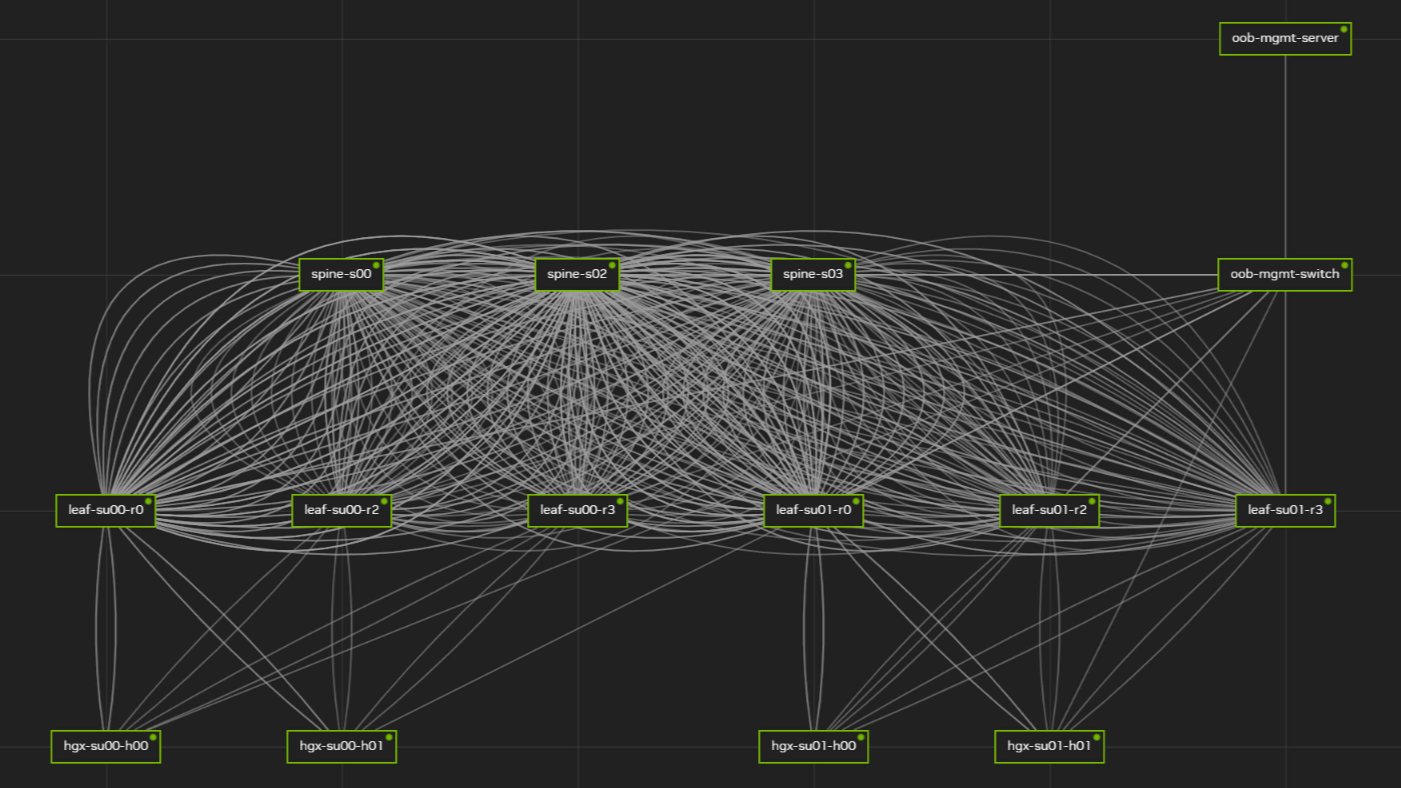
NVIDIA Air is designed to let network teams model and validate an AI factory network before physical infrastructure is delivered. The source describes a cloud-based, browser-accessed digital-twin environment in which teams can represent switches, adapters, cables, servers, and network connections, then test provisioning, automation, and security policies. It is relevant when a project needs to reduce uncertainty in network design and Day 0 preparation for AI workloads.
The deployment problem NVIDIA Air addresses
AI workloads can vary substantially in scale and operating requirements, but the network remains a critical part of delivering performance and realizing value from the infrastructure. Physical build-outs can delay topology validation, configuration work, and operator training until hardware is present. NVIDIA Air provides a virtual environment intended to move those activities earlier in the deployment process.
According to the source, administrators can begin modeling each switch, adapter, and cable in an AI factory design before a hardware shipment. This makes the platform most applicable to teams that need to examine a proposed network configuration, automate repeatable setup tasks, or prepare operational procedures ahead of installation.
Capabilities described in the source
- Model data center network environments through a cloud interface that runs in a browser.
- Create simulations from prebuilt demonstrations in the NVIDIA Air Demo Marketplace or with a drag-and-drop topology builder.
- Add servers and switches, set node names and selected properties, and connect nodes through the Connector area.
- Select network operating system options referenced in the source, including NVIDIA Cumulus and SONiC, or bring compatible user equipment into a simulation.
- Integrate simulations with network tools such as NetQ, as described in the source.
- Configure CPU, memory, storage, and advanced options such as UEFI Secure Boot when building nodes.
The source also states that simulations can be started quickly, but project teams should not treat that statement as a capacity commitment. Actual startup time, scale, operating-system options, integrations, and account entitlements should be confirmed in dated NVIDIA Air documentation for the intended environment.
Topology creation and out-of-band management
Prebuilt experiments can provide a starting point for learning or controlled testing. The source describes labs covering multiple environments, including demonstrations of fabric choices and three-tier spine-leaf configurations for larger data center designs. A copied marketplace simulation can be explored and changed by the account holder.
For a custom design, the drag-and-drop builder enables teams to place nodes in a workspace, assign properties, and link them. The source also describes an Enable OOB setting that adds an out-of-band management network, including oob-mgmt-switch and oob-mgmt-server. When SSH is enabled in the simulation, the management server can be the local connection point for transferring Ansible scripts, binaries, and configuration files. This option may be useful for repeatable configuration workflows, but projects with isolation or regulatory constraints should assess whether an out-of-band path is appropriate.
Evaluation path and operational considerations
- Define the target topology, node roles, and the configuration or policy questions the team needs to answer.
- Start with a relevant prebuilt experiment or create a custom topology using the builder.
- Set node properties, connect systems, and decide whether out-of-band management is required.
- Test provisioning, automation, security-policy behavior, and administrative access procedures in the simulation.
- Document the validated configuration and retest it against the complete physical SKU/BOM and final software versions before production deployment.
The source notes that a node can be rebuilt to its original state and reset to restart it. It also distinguishes simulation sleep from expiration: sleep stores the simulation state while nodes are unpowered, whereas expiration deletes the simulation. Shared simulations are the same simulation rather than separate copies. Read-only users cannot modify or delete the simulation, although the source states they can still access node consoles and make changes through them. Teams should therefore review sharing and console-access controls before using a simulation for collaborative work.
FAQ
Can NVIDIA Air replace validation on physical hardware?
No such replacement claim is established by the source. NVIDIA Air can support early design and configuration testing, but the final topology, hardware compatibility, performance behavior, operating-system versions, and integration requirements should be verified against dated official documentation, the complete SKU/BOM, and a project-specific test.
Can a simulation be changed after it starts?
The source states that node properties cannot be edited after the simulation is first started. Teams should therefore review node settings before launch and use rebuild or reset actions only with a clear understanding of their effects on the test environment.
Conclusion
NVIDIA Air provides a browser-based approach to modeling and testing AI factory network environments before physical deployment. Its value is in earlier topology, automation, and operational validation; its limits are that final deployment decisions still require documentation review and testing with the exact intended hardware and software configuration.
After reviewing NVIDIA Air for AI Factory Network Simulation, continue with NVIDIA products and networking solutions for related evaluation paths.

 WeChat
 Profile